

NAVAIR 01-1A-505-2
007 02
TO 00-25-255-1
Page 47
TM 1-1500-323-24-2
59. Unwired Contact Removal.
WARNING
Metal tool tips are sharp and can cause injury
to personnel and/or damage to connectors.
CAUTION
Present metal tooling in some instances has
damaged the wire sealing grommet at the end
of the connectors. Plastic tools are preferred.
Caution should be exercised in the use of
tooling.
Inspect tips of metal tools for distortion or
nicks of probe before use as connector damage
can occur.
a.
Select correct unwired removal tool (Table 6).
b. With rear of connector exposed, remove sealing
plug from insert cavity of contact to be removed.
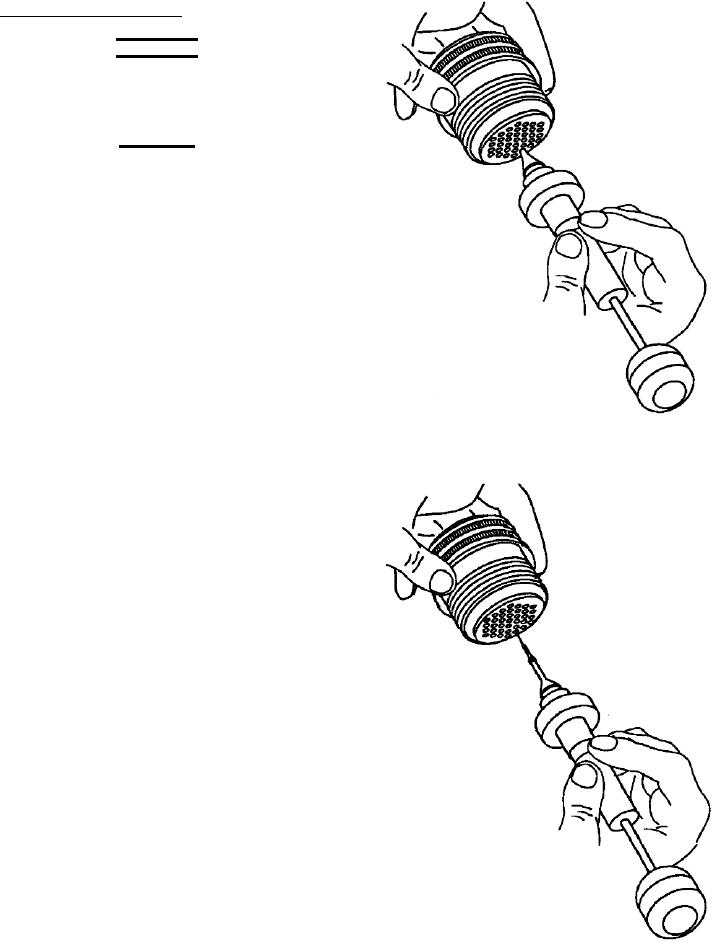
Figure 18. Unlocking Contact Retention Mechanism
With Unwired Contact Removal Tool
c.
Press and hold tool plunger until tip of tool is
aligned with contact to be removed.
d. Axially align removal tool with contact to be
removed.
e.
Insert removal tool tip into contact cavity to
butt contact wire barrel; then slide removal tool sleeve
over contact and exert pressure until sleeve bottoms
(Figure 18).
f.
Remove tool and unlocked contact from
connector by withdrawing tool from connector
(Figure 19).
g. Remove contact from removal tool by pressing
plunger.
Figure 19. Extracting Contact from Connector