

TM 1-7010-386-12&P
MAINTENANCE
0009 00
CHARGING A SPARE BATTERY
The rugged AC/DC adapter/charger has provisions for charging a spare battery while powering a computer. The
following provides instructions for inserting a battery to be charged and for removing a battery. A battery can be
inserted or removed while power is applied to the unit.
WARNING
Battery may explode if wrong battery is used. The rugged AC/DC
Adapter/charger is designed to charge only Miltope part number
M207-11 or 711731, or equivalent batteries.
NOTE
Some batteries are equipped with a pull-out tab while others have a strap.
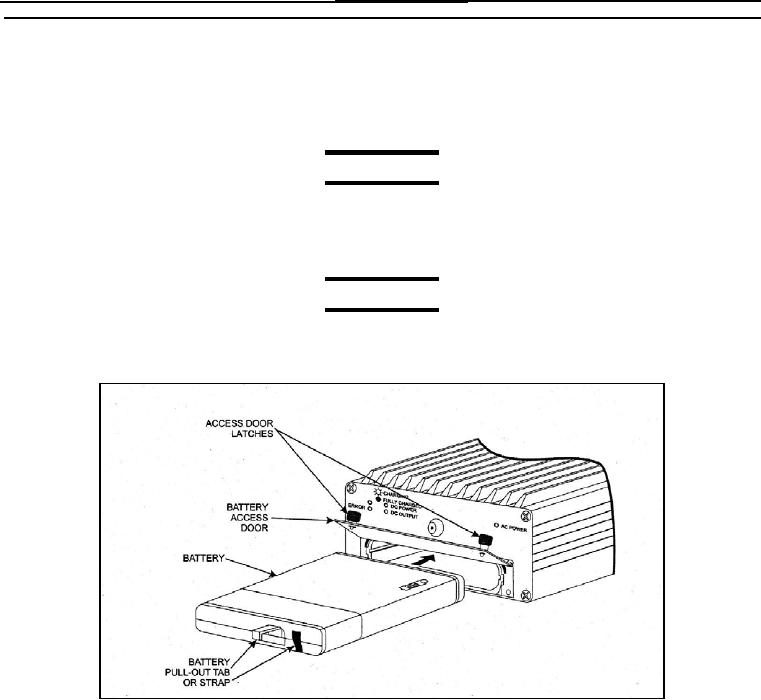
Figure 3. Inserting and removing a Battery
Inserting a Battery
To insert a battery, refer to Figure 3 and proceed as follows:
1. Rotate battery access door latches counterclockwise and open door.
2. Orient battery as shown in Figure 3 and slide into unit until battery is fully seated.
3. As applicable, ensure that battery pull-out tab is not extended and close and latch battery access door.
Removing the Battery
To remove the battery, refer to Figure 3 and proceed as follows:
1. Rotate battery access door latches counterclockwise and open door.
0009 00-5