

TM 1-7010-386-12&P
OPERATION UNDER USUAL CONDITIONS
0005 00
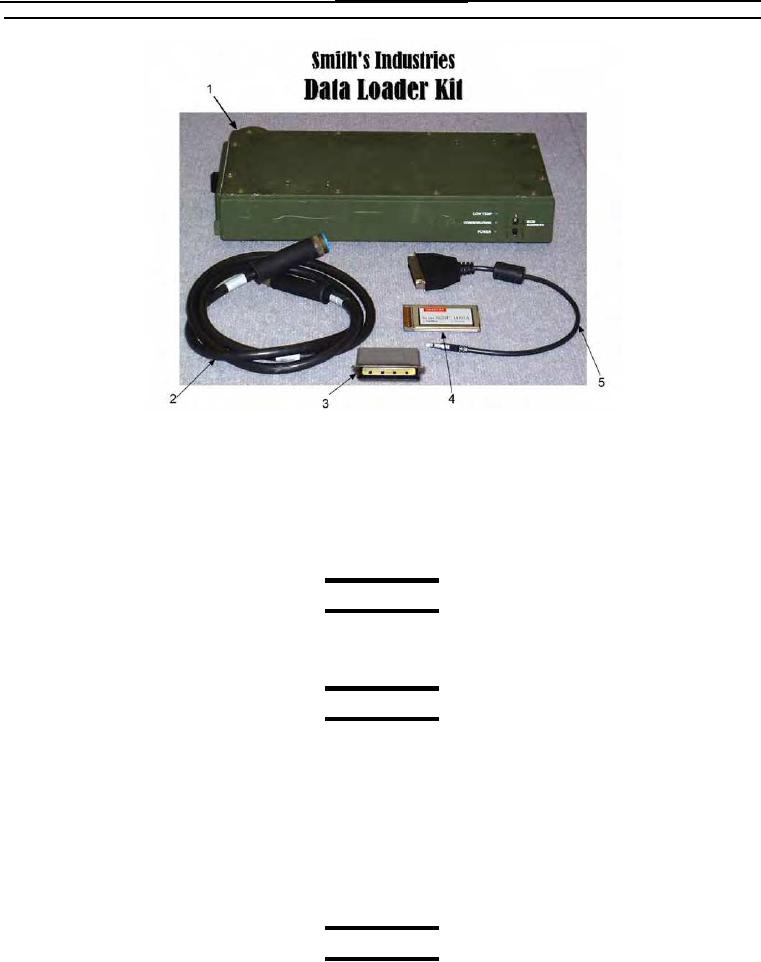
The parts required to connect the SDTMR are: (1) Transfer Unit (2) Cable Assembly, Power (3) Dummy Load
Terminator (4) Cable Assembly, SCSI PCMCIA Card (5) SCSI PCMCIA Card
1. Unlock the access bay door of the Transfer Unit (1) and insert the data transfer module (not pictured) into
the slot. (To remove the data transfer module, push the REL button.)
2. Connect the female end of the Power Cable (2) to J3 on the Transfer Module (1).
NOTE
The data transfer module (DTM) must be installed before cables are connected to AMPS.
NOTE
The system will not recognize the SDTMR if you plug and unplug the SCSI cable with
power on. Power must be removed from everything, insert the DTM, and then boot up
the computer. The computer will then be able to recognize the SDTMR and DTMs can
be hot swapped.
3. Connect the male end of the Power Cable (2) to J4 of the External Power Unit.
4. Connect the Dummy Load Terminator (3) to J1 of the Transfer Unit (1).
NOTE
The terminator has to be installed/connected in order for the SDTMR
to be operational.
0005 00-6