

NAVAIR 01-1A-505-2
011 02
TO 00-25-255-1
Page 17
TM 1-1500-323-24-2
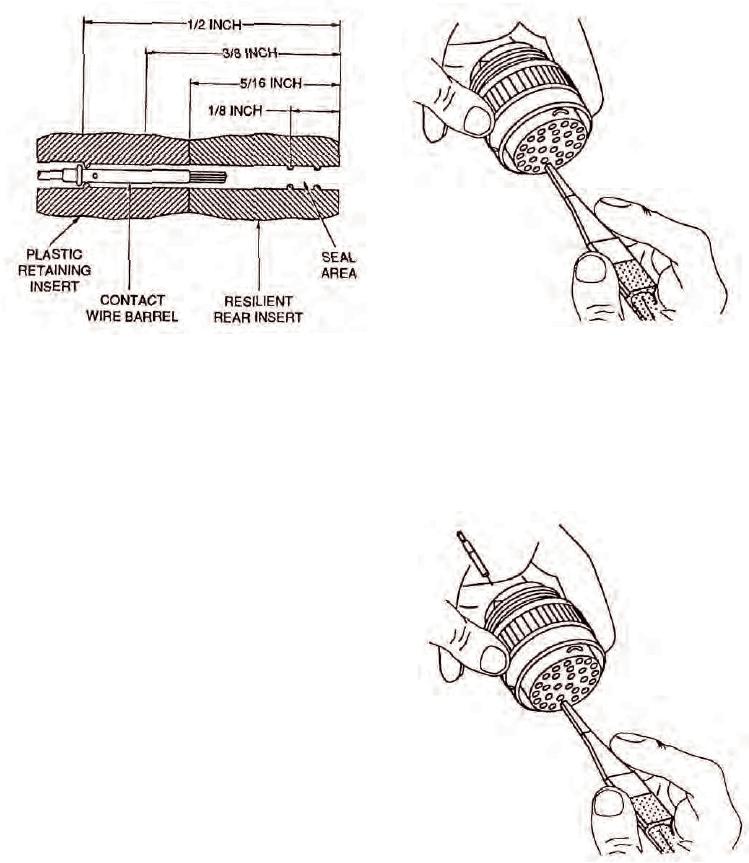
Figure 19. Unlocking Contact Retention
Figure 18. Typical Connector Dimensions
Mechanism With Broken Wire
d. Gently insert removal tool into cavity in about
1
is felt.
NOTE
Rotating removal tool works splayed wire
strands into slot of tool, allowing tool to pass.
Removal tool may be blocked at rear of contact
by plastic insert or additional strands of broken
wire.
e.
If resistance is felt before removal tool reaches
back end of contact, withdraw tool slightly, rotate 1/6 of
a turn, and reinsert tool. Repeat rotating and insertion
Procedure until tool passes with minimum additional
force to 5/16 inch depth back end of contact (Figure 19).
f.
Wiggle removal tool gently to help guide into
insert bore and over back of contact. Additional rotation
may be required if broken strands are encountered.
g. Continue insertion of removal tool until
positive stop is felt at about 1/2 inch depth.
Figure 20. Broken Wire Contact Removal
h. Exert axial pressure on engaging end of contact,
using appropriate pin or socket as pusher. (If contact
does not move, seat removal tool more firmly.)
i.
Push contact completely out rear of connector
before disengaging removal tool (Figure 20).